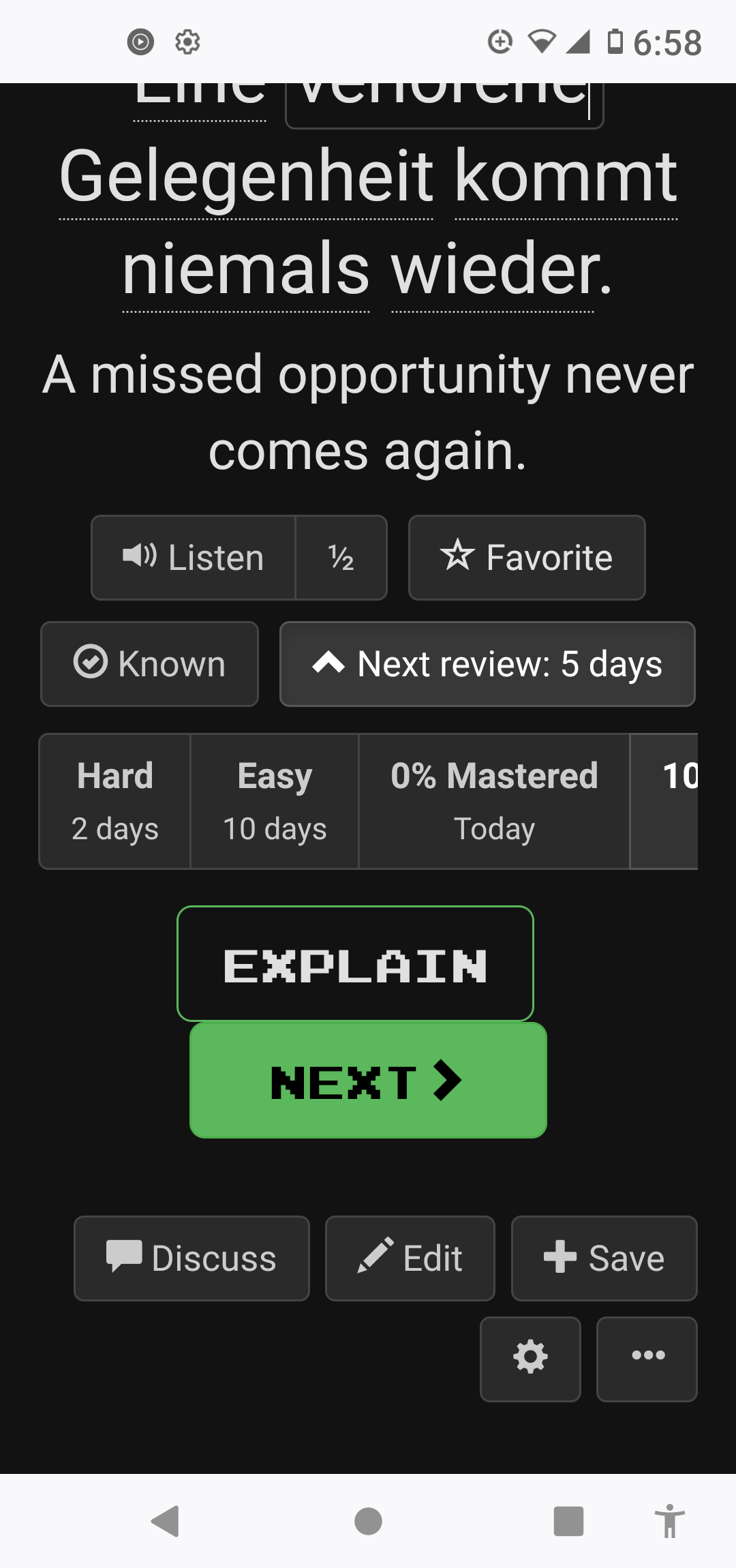
While most UI elements in Clozemaster reflow when used on a narrow screen (like a phone), this is not true of the row of buttons “Hard”/“Easy”/“0% Mastered”/“100% Mastered”/“Ignore”. As a result, I can’t get to the “Ignore” button at all. Horizontal scroll doesn’t work, and neither does a pinch gesture. If I set Firefox’s “text size” setting to 95%, all of a sudden everything gets a lot smaller (smaller than I’d like), but the “Ignore” button is sometimes fully and sometimes partially visible. However, sometimes it’s not available at all, and I don’t know why, given that sometimes I can see space on the rightmost side of the rightmost button (“100% Mastered”).
Summary of problems:
- the “Hard”/…/“Ignore” buttons don’t reflow
- the “Ignore” button doesn’t always appear, even if there’s room on the right for it to be at least partially visible
- the site seems to disable pinch (or at least doesn’t let me use it to the extent I would need to work around this problem)
- there’s no way to scroll horizontally
This applies in both Firefox and Chrome on Android.
Screenshot: